
Sector 02 · Tracker
Import from screenshots
Drop your FOB screenshots and the page reads them: DMZ level, bank, printed upgrades, stash counts and operator builds land in the right places. It all happens in your browser; nothing is uploaded.
- Reads
- 3 screens
- Upload
- none
- Checks
- you
Step 1
Add screenshots
Drag them here, paste from the clipboard, or . Xbox, PlayStation and PC captures at 16:9 work; take them full-screen and uncropped.
First read loads a 7 MB text reader once; after that it is quick. Everything stays on this device.
Which screens
Three screens carry everything
Each one fills a different part of the tracker. The page works out which screen it is looking at from the title, so order does not matter.
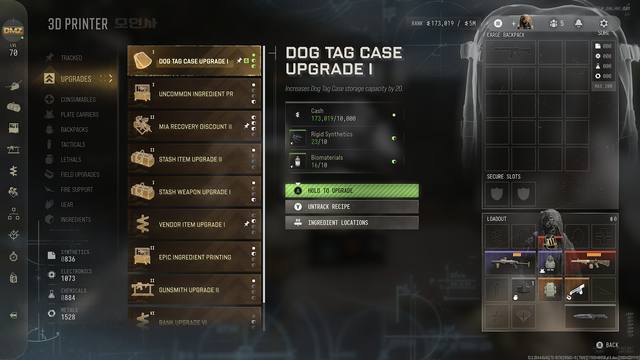 3D Printer
Open the 3D Printer and the Upgrades tab. The board lists the next tier of every upgrade line, so one screenshot tells the tracker what you have printed. Click an upgrade before you capture and its ingredient counts come through too (scroll and take a second one for the rest of the list).
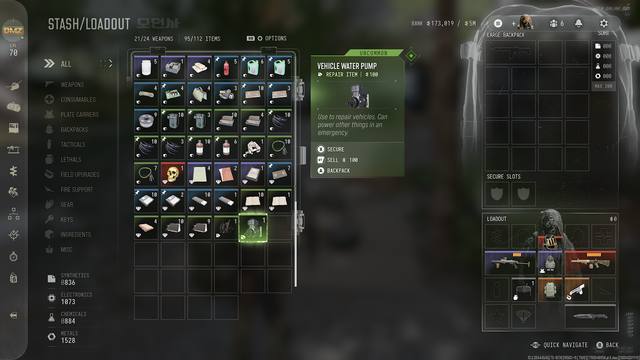 Stash
StashOpen Stash/Loadout and pick the Ingredients filter on the left (Misc for valuables). Every tile is matched by its icon and the number in its corner; scroll and capture again if the list runs past the screen.
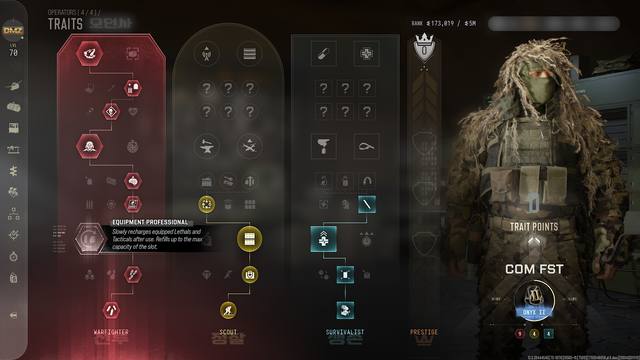 Traits
Open an Operator's Traits screen with the cursor parked off the trees. Lit nodes become that operator's build on My Build, and the three options each row rolled are saved for the row ranking.